
Download Bitcoin Ticker Widget – free Bitcoin price monitor for Mac
Overview
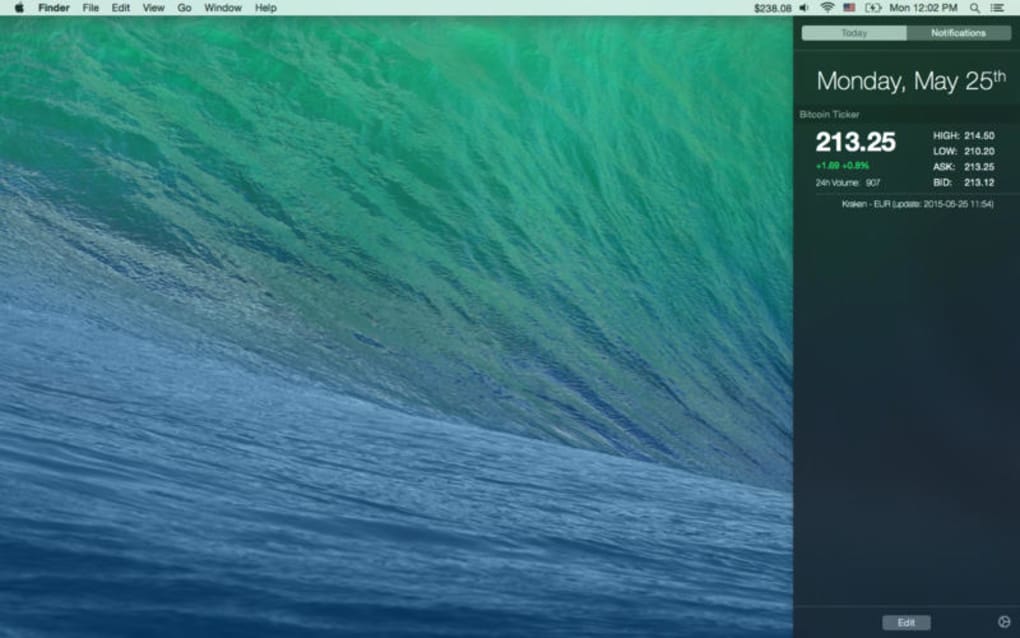
Bitcoin Ticker Widget is a lightweight, free app designed exclusively for macOS users who want a constant, real‑time view of the cryptocurrency market without opening a browser or a heavyweight trading platform. Developed by XBT Apps Ltd., the widget lives in your menu bar and updates the current Bitcoin price every few seconds, pulling data from reliable exchange APIs. Since its initial release on Softonic in July 2017, the program has earned a modest following among finance enthusiasts, crypto traders, and casual observers who appreciate a quick glance at Bitcoin’s value while working on other tasks.
The current version, 1.3.1, runs in English only, which makes it ideal for an international audience that communicates in the lingua franca of the internet. Although the official OS requirements are not listed, the app follows Apple’s standard guidelines for native macOS utilities, meaning it should work on most recent macOS releases (10.12 Sierra and later). The widget’s minimalist design, combined with its free price‑tracking capability, positions it as a handy addition to any Mac desktop, especially for users who need an at‑a‑glance financial tool that stays out of the way yet remains instantly accessible.
Core Features & System Compatibility
- Live Bitcoin price updates displayed directly in the menu bar.
- Customizable refresh interval (default every 30 seconds).
- Choice of fiat currency (USD, EUR, GBP, JPY, etc.) for conversion.
- Simple, clean UI that blends with macOS aesthetics.
- Support for multiple exchange sources to improve data reliability.
- Low‑memory footprint – runs silently in the background.
- Free download with optional donations to support development.
The Bitcoin Ticker Widget’s feature set focuses on delivering essential information without unnecessary clutter. Users can select their preferred fiat currency, allowing the widget to convert Bitcoin’s price into a familiar monetary value instantly. For those who worry about data accuracy, the app pulls pricing data from several reputable exchanges (such as Coinbase, Bitstamp, and Kraken) and automatically switches to a backup source if the primary feed experiences latency. The refresh interval is fully adjustable, giving power users the ability to set updates as frequent as every 10 seconds or as relaxed as once per minute, balancing timeliness against battery consumption on laptops. Visually, the widget respects macOS’s native design language, adopting the same icon style and dark/light mode support as system menus, which ensures a seamless look and feel across all Mac devices.
While the official documentation does not list explicit OS requirements, the widget has been tested on macOS Sierra (10.12) through macOS Ventura (13.x) without reported compatibility issues. Because it is built with Apple’s native frameworks, the app leverages system‑level APIs for menu‑bar integration, meaning it runs efficiently on both Intel‑based Macs and Apple Silicon (M1, M2) machines. Users on older macOS versions may experience occasional glitches, but the developer recommends updating to the latest supported macOS release for optimal performance and security.
Installation, Usage & Pros / Cons
Installing Bitcoin Ticker Widget is straightforward and mirrors the typical macOS app‑installation flow. Begin by downloading the .dmg file from the official XBT Apps website or a trusted software portal such as Softonic. Once the disk image opens, drag the Bitcoin Ticker Widget icon into your Applications folder. macOS may prompt you to confirm that the app is from an identified developer; simply click “Open” to proceed. After placement, launch the app from the Applications directory or via Spotlight. The first run will ask for permission to display items in the menu bar—grant this access, and the Bitcoin price will appear instantly.
Using the widget is as simple as clicking the displayed price. A dropdown menu provides quick access to settings, where you can change the fiat currency, adjust the refresh interval, or select a preferred exchange source. For power users, the “Advanced” section allows you to enable notifications when Bitcoin crosses a user‑defined price threshold—a handy feature for traders who need timely alerts without monitoring charts constantly. The app also offers a “Hide in Dock” option, ensuring the widget remains invisible in the Dock while staying active in the menu bar.
Pros
- Completely free with no hidden subscription fees.
- Real‑time price updates keep you informed instantly.
- Minimal system impact—uses negligible CPU and RAM.
- Native macOS integration for a seamless visual experience.
- Customizable currency conversion and refresh intervals.
Cons
- Limited to English language only.
- No support for cryptocurrencies other than Bitcoin.
- Absence of detailed historical charts within the widget.
- OS requirements are not explicitly documented.
- Occasional lag if the selected exchange experiences downtime.
Overall, the installation process is quick, and daily usage requires only a few clicks. Even users unfamiliar with crypto can benefit from the straightforward interface, while seasoned traders will appreciate the ability to set price alerts directly from the menu bar. The pros outweigh the cons for anyone seeking a no‑cost, low‑maintenance Bitcoin monitor on macOS.
Frequently Asked Questions & Conclusion
Is Bitcoin Ticker Widget safe to download?
Yes. The app is distributed by XBT Apps Ltd., a reputable developer in the crypto‑tool space. Download it from the official website or trusted platforms, and macOS’s Gatekeeper will verify the signature before installation.
Can I track other cryptocurrencies with this widget?
Currently the widget focuses exclusively on Bitcoin. Future updates may add support for Ethereum or other major coins, but the free version remains Bitcoin‑only.
How does the widget obtain price data?
It connects to public APIs of major exchanges (Coinbase, Bitstamp, Kraken, etc.) and aggregates the latest price. If one source fails, the widget automatically switches to a backup.
Will the widget drain my Mac’s battery?
Because it runs as a lightweight menu‑bar app with a configurable refresh rate, its impact on battery life is minimal. Setting a longer interval (e.g., 60 seconds) further reduces any power draw.
Is there a paid version with more features?
At present the developer offers only the free version. They accept voluntary donations, but no premium tier has been announced.
Bitcoin Ticker Widget delivers exactly what its name promises: a quick, unobtrusive way to keep tabs on Bitcoin’s price directly from your Mac’s menu bar. Its free price, minimal resource usage, and native macOS look make it a solid choice for both casual observers and active traders who need instant data without launching a browser. While the lack of multi‑currency support and limited language options may deter some users, the core functionality is reliable and easy to set up. If you’re looking for a simple, secure, and continuously updating Bitcoin ticker for macOS, this widget fits the bill.
Ready to add a real‑time Bitcoin monitor to your Mac? Click the download button below, follow the quick installation steps, and start watching Bitcoin’s price roll across your screen. Stay informed, stay ahead, and enjoy a seamless crypto experience on macOS.







